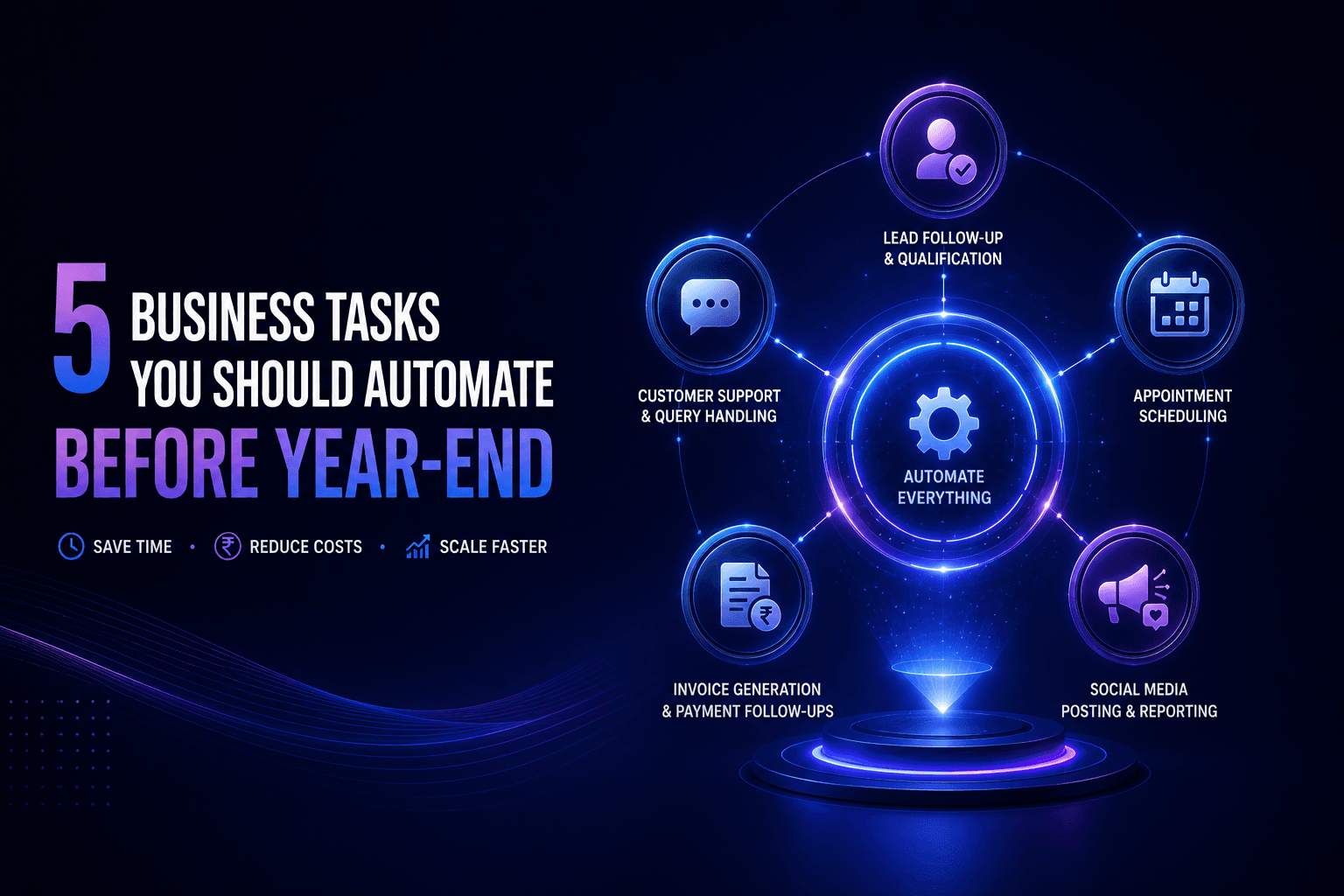
5 Business Tasks You Should Automate Before the End of This Year
5 Business Tasks You Should Automate Before the End of This Year
5 Business Tasks You Should Automate Before the End of This Year
Take a look at how your day actually breaks down. How much of it is spent on things that feel productive but are really just the same tasks on repeat chasing a payment, answering the same support question for the hundredth time, trying to find a meeting slot that works for both sides?
None of that is growing your business. It is just keeping the lights on.
The good news is that most of it does not need a human anymore. Here are five tasks worth automating right now.
1. Lead Follow-Up and Qualification
Every minute that passes after someone fills out your form, their interest drops. By the time your team gets around to calling if they do at all the moment has passed. The lead has gone cold or spoken to someone faster.
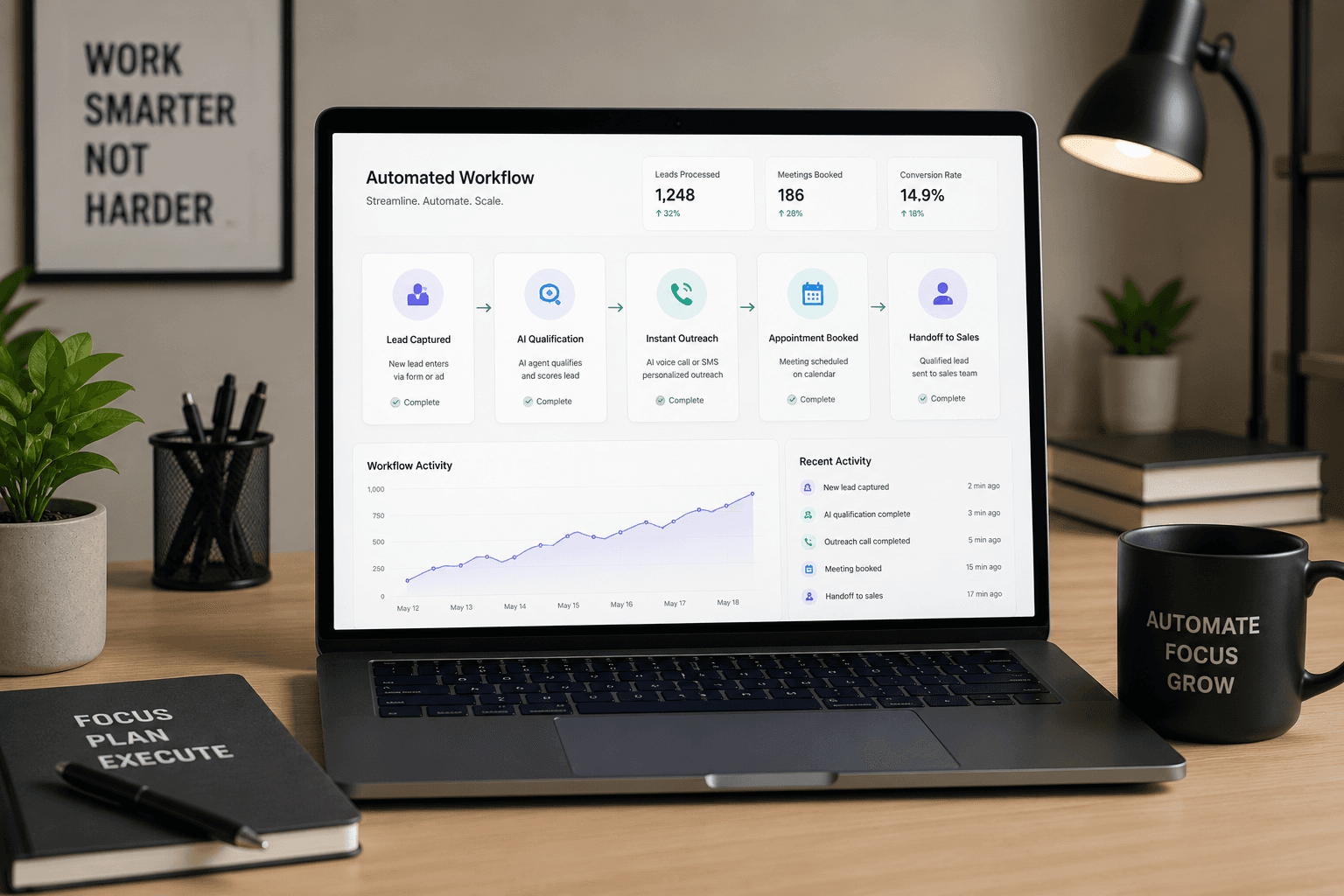
AI voice agents fix this by responding within seconds. Not minutes. Seconds. The system calls the lead, has a real qualifying conversation, categorises them, and books a meeting if they are worth pursuing before your team has even seen the notification.
Stat: Automating lead follow-up generates up to 451% more qualified leads than manual outreach. (The Annuitas Group)
Stat: 78% of customers buy from whoever responds first. (Salesforce)
2. Customer Support and Query Handling
"Where is my order?" "How do I reset my password?" "What are your hours?"
If real people on your team are answering these every day, that is an enormous amount of time going into questions that follow the same pattern every single time.
A well-built AI support agent handles these around the clock on WhatsApp, your website, email, wherever your customers reach out. It tracks orders, answers FAQs, raises tickets for anything complex, and only pulls in a human when the situation actually calls for one.
Your team stops spending half their day on repetitive queries. Your customers get answers instantly, even at midnight.
Stat: AI support tools handle up to 80% of routine queries without any human involvement. (IBM)
Stat: Businesses using automated support see a 50 to 68% drop in average resolution time. (Zendesk)
3. Appointment Scheduling and Reminders
Count how many emails it takes to lock in a single meeting. Someone suggests a time, the other person cannot make it, alternatives go back and forth, someone forgets to send a calendar invite. Multiply that across your whole team for a week.
Automated scheduling cuts all of that out. You share a link, the other person picks a slot based on your live availability, and the meeting is confirmed with reminders already scheduled for both sides. Nobody chases anybody.
When this connects with an AI voice agent that qualifies leads on a call, the meeting gets booked inside the same conversation no back and forth, no dropped balls.
Stat: Scheduling tools save an average of 8 hours per week in admin time. (Calendly Research)
Stat: Automated reminders cut no-shows by up to 29%. (Software Advice)
4. Invoice Generation and Payment Follow-Ups
Most late payments do not happen because clients are unwilling to pay. They happen because nobody followed up at the right moment. The invoice went out, life got busy, and nobody chased it until the cash flow situation became uncomfortable.
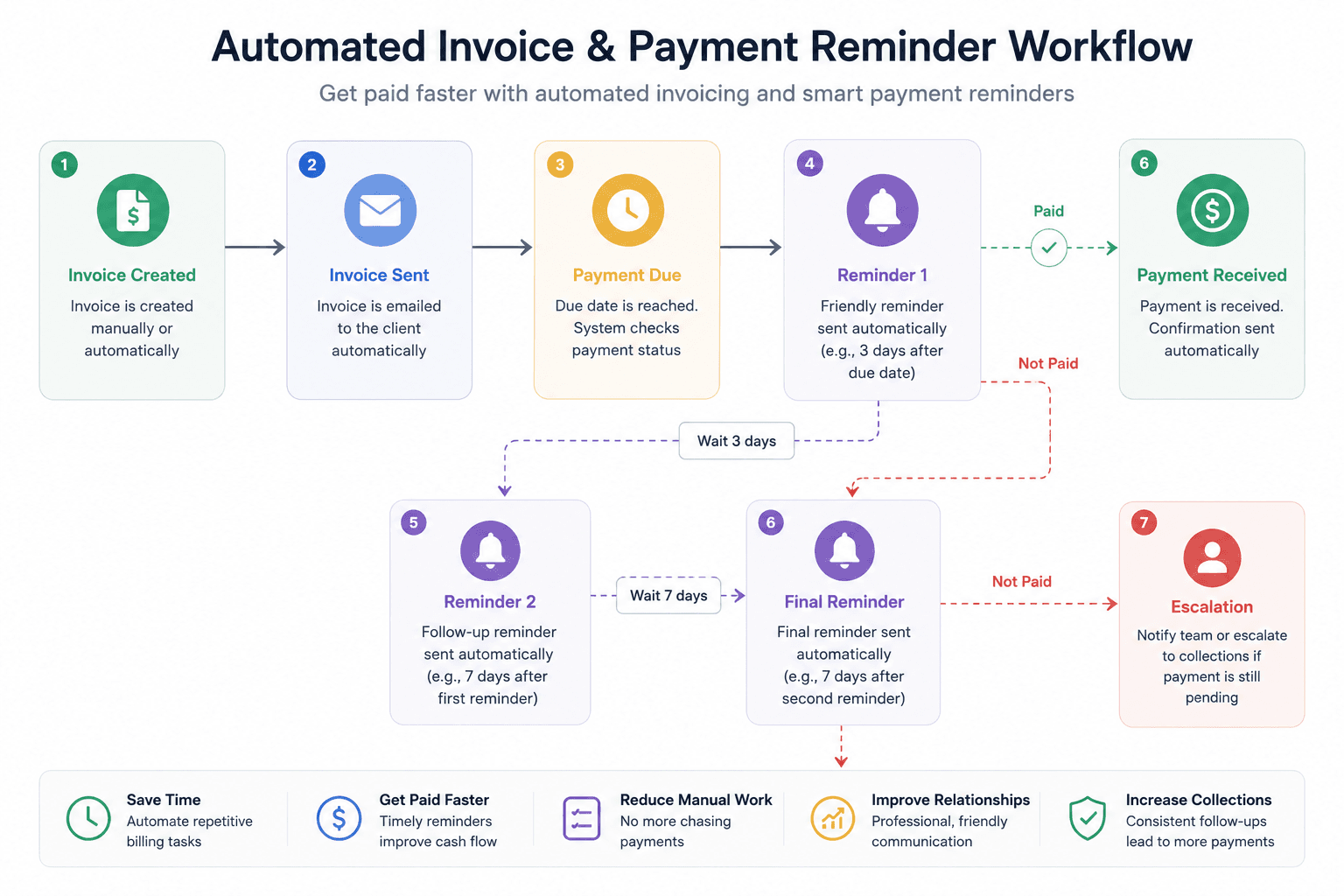
Automated invoicing handles the entire cycle. Invoices go out the moment a milestone is reached. Reminders follow at set intervals before the due date, on it, and a few days after. When payment comes in, a receipt goes out automatically.
No awkward emails. No wondering who was supposed to follow up. No revenue quietly slipping away because something fell through the cracks.
Stat: Businesses that automate invoicing collect payments 30% faster on average. (FreshBooks)
Stat: 60% of invoices sent without automated follow-up get paid late. (Xero)
5. Social Media Posting and Reporting
Staying consistent on social media while running a business is harder than it sounds. Most teams either burn themselves out trying to post daily or go completely quiet for stretches at a time neither of which builds an audience.
Scheduling tools let you sit down once a week or once a month, plan everything out, and let the system publish at the right times across every platform. No daily scramble. No missed posting days.
Reporting works the same way reach, engagement, follower growth, best-performing content, all pulled together automatically. No manually logging into five different apps to build a spreadsheet.
Stat: Consistent posting generates 67% more leads per month than sporadic activity. (HubSpot)
Stat: 73% of marketers say automation saves them more than 6 hours every week. (Social Media Examiner)
How to Choose Where to Start
With so many tools out there the choice can feel overwhelming. Keep it simple.
Start with whatever is costing you the most time or money right now. For most businesses that is either lead follow-up or customer support both have fast, measurable returns when automated properly.
Look for tools that plug into what you already use. The best setups do not require rebuilding your entire tech stack they connect to your existing CRM, WhatsApp, email, and calendar.
Start with one thing. Get it working properly. Measure what changes. Then move to the next.
And remember the goal here is not to remove people from your business. It is to remove the work that stops your people from doing what actually requires them.
Stat: Businesses that implement automation report a 20 to 35% increase in operational efficiency within the first six months. (McKinsey)
Frequently Asked Questions
1. Is automation only for bigger businesses?
Not at all. Smaller teams arguably benefit more automation lets a handful of people do work that would otherwise need a much larger headcount.
2. How much does it cost to get started?
Depends on what you are automating. Many tools start at a few thousand rupees a month far less than the staff time they replace.
3. Will it make my business feel robotic?
Only if it is set up badly. Good automation handles the repetitive work so your team has more time for the conversations and relationships that actually need a human.
4. What is the easiest thing to automate first?
Appointment scheduling or social media posting both are low-effort to set up and immediately free up time. Lead follow-up delivers the highest return but takes slightly more thought to configure well.
5. How will I know if it is working?
Pick two or three metrics before you start response time, conversion rate, payment turnaround, whatever matters most for that task. Check them again after 30 days. The difference tends to show up faster than most people expect.
5 Business Tasks You Should Automate Before the End of This Year
Take a look at how your day actually breaks down. How much of it is spent on things that feel productive but are really just the same tasks on repeat chasing a payment, answering the same support question for the hundredth time, trying to find a meeting slot that works for both sides?
None of that is growing your business. It is just keeping the lights on.
The good news is that most of it does not need a human anymore. Here are five tasks worth automating right now.
1. Lead Follow-Up and Qualification
Every minute that passes after someone fills out your form, their interest drops. By the time your team gets around to calling if they do at all the moment has passed. The lead has gone cold or spoken to someone faster.
AI voice agents fix this by responding within seconds. Not minutes. Seconds. The system calls the lead, has a real qualifying conversation, categorises them, and books a meeting if they are worth pursuing before your team has even seen the notification.
Stat: Automating lead follow-up generates up to 451% more qualified leads than manual outreach. (The Annuitas Group)
Stat: 78% of customers buy from whoever responds first. (Salesforce)
2. Customer Support and Query Handling
"Where is my order?" "How do I reset my password?" "What are your hours?"
If real people on your team are answering these every day, that is an enormous amount of time going into questions that follow the same pattern every single time.
A well-built AI support agent handles these around the clock on WhatsApp, your website, email, wherever your customers reach out. It tracks orders, answers FAQs, raises tickets for anything complex, and only pulls in a human when the situation actually calls for one.
Your team stops spending half their day on repetitive queries. Your customers get answers instantly, even at midnight.
Stat: AI support tools handle up to 80% of routine queries without any human involvement. (IBM)
Stat: Businesses using automated support see a 50 to 68% drop in average resolution time. (Zendesk)
3. Appointment Scheduling and Reminders
Count how many emails it takes to lock in a single meeting. Someone suggests a time, the other person cannot make it, alternatives go back and forth, someone forgets to send a calendar invite. Multiply that across your whole team for a week.
Automated scheduling cuts all of that out. You share a link, the other person picks a slot based on your live availability, and the meeting is confirmed with reminders already scheduled for both sides. Nobody chases anybody.
When this connects with an AI voice agent that qualifies leads on a call, the meeting gets booked inside the same conversation no back and forth, no dropped balls.
Stat: Scheduling tools save an average of 8 hours per week in admin time. (Calendly Research)
Stat: Automated reminders cut no-shows by up to 29%. (Software Advice)
4. Invoice Generation and Payment Follow-Ups
Most late payments do not happen because clients are unwilling to pay. They happen because nobody followed up at the right moment. The invoice went out, life got busy, and nobody chased it until the cash flow situation became uncomfortable.
Automated invoicing handles the entire cycle. Invoices go out the moment a milestone is reached. Reminders follow at set intervals before the due date, on it, and a few days after. When payment comes in, a receipt goes out automatically.
No awkward emails. No wondering who was supposed to follow up. No revenue quietly slipping away because something fell through the cracks.
Stat: Businesses that automate invoicing collect payments 30% faster on average. (FreshBooks)
Stat: 60% of invoices sent without automated follow-up get paid late. (Xero)
5. Social Media Posting and Reporting
Staying consistent on social media while running a business is harder than it sounds. Most teams either burn themselves out trying to post daily or go completely quiet for stretches at a time neither of which builds an audience.
Scheduling tools let you sit down once a week or once a month, plan everything out, and let the system publish at the right times across every platform. No daily scramble. No missed posting days.
Reporting works the same way reach, engagement, follower growth, best-performing content, all pulled together automatically. No manually logging into five different apps to build a spreadsheet.
Stat: Consistent posting generates 67% more leads per month than sporadic activity. (HubSpot)
Stat: 73% of marketers say automation saves them more than 6 hours every week. (Social Media Examiner)
How to Choose Where to Start
With so many tools out there the choice can feel overwhelming. Keep it simple.
Start with whatever is costing you the most time or money right now. For most businesses that is either lead follow-up or customer support both have fast, measurable returns when automated properly.
Look for tools that plug into what you already use. The best setups do not require rebuilding your entire tech stack they connect to your existing CRM, WhatsApp, email, and calendar.
Start with one thing. Get it working properly. Measure what changes. Then move to the next.
And remember the goal here is not to remove people from your business. It is to remove the work that stops your people from doing what actually requires them.
Stat: Businesses that implement automation report a 20 to 35% increase in operational efficiency within the first six months. (McKinsey)
Frequently Asked Questions
1. Is automation only for bigger businesses?
Not at all. Smaller teams arguably benefit more automation lets a handful of people do work that would otherwise need a much larger headcount.
2. How much does it cost to get started?
Depends on what you are automating. Many tools start at a few thousand rupees a month far less than the staff time they replace.
3. Will it make my business feel robotic?
Only if it is set up badly. Good automation handles the repetitive work so your team has more time for the conversations and relationships that actually need a human.
4. What is the easiest thing to automate first?
Appointment scheduling or social media posting both are low-effort to set up and immediately free up time. Lead follow-up delivers the highest return but takes slightly more thought to configure well.
5. How will I know if it is working?
Pick two or three metrics before you start response time, conversion rate, payment turnaround, whatever matters most for that task. Check them again after 30 days. The difference tends to show up faster than most people expect.
Copyright © 2026 Tapitt. All rights reserved. • Privacy Policy
Copyright © 2026 Tapitt. All rights reserved. • Privacy Policy
Copyright © 2026 Tapitt. All rights reserved. • Privacy Policy